|
August 2010
 ast
month, at Hi-Fi Centre in Vancouver, Wilson Audio Specialties'
Sophia Series 3 loudspeaker made its Canadian debut, with
Wilson's Peter McGrath in attendance. This latest version of the
Sophia ($16,700 USD/pair) features the same tweeter and midrange
as do Wilson's more expensive Sasha W/P and MAXX 3 models, and
the woofer's magnet strength has been doubled and its cone
reinforced. The cabinet has also been improved with
Wilson's proprietary S material, first
used in the Sasha's midrange/tweeter baffle. The rest of the
cabinet is made of
Wilson's X material. ast
month, at Hi-Fi Centre in Vancouver, Wilson Audio Specialties'
Sophia Series 3 loudspeaker made its Canadian debut, with
Wilson's Peter McGrath in attendance. This latest version of the
Sophia ($16,700 USD/pair) features the same tweeter and midrange
as do Wilson's more expensive Sasha W/P and MAXX 3 models, and
the woofer's magnet strength has been doubled and its cone
reinforced. The cabinet has also been improved with
Wilson's proprietary S material, first
used in the Sasha's midrange/tweeter baffle. The rest of the
cabinet is made of
Wilson's X material.
The
electronics used in the demo comprised a
Classe CT-series surround
processor and amplifier and McGrath's laptop computer, outfitted
with a Weiss INT202 FireWire digital converter. The demo came
alive when McGrath played some 24-bit/88.2kHz recordings he'd
made using prototype microphones developed by the legendary Joe
Grado. One orchestral piece highlighted the Sophia's ability to
re-create the large-scale dynamics of a full orchestra. The
kettle and bass drums were easily distinguished from each other,
and the speakers energized the entire room with an amazing
amount of bass energy without overloading it. The orchestra
filled a huge space between the speakers and individual
instruments were imaged precisely within that space.
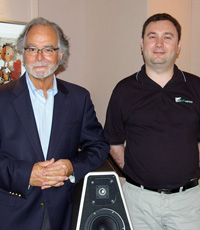 When
I spoke with Igor Kivritsky (in photo on right with Peter
McGrath), general manager of Hi-Fi Centre, he stated that he's
pleased to be one of Wilson's newest dealers -- of which,
according to McGrath, there are only 34 in the entire world.
Kivritsky believes that offering seminars by representatives of
the many well-established brands he carries -- including B&W,
Classe, Magnepan, McIntosh, Linn,
Naim, Totem, and Wilson -- is important in reconnecting with
past customers, and he hopes it will bring in new customers as
well. When
I spoke with Igor Kivritsky (in photo on right with Peter
McGrath), general manager of Hi-Fi Centre, he stated that he's
pleased to be one of Wilson's newest dealers -- of which,
according to McGrath, there are only 34 in the entire world.
Kivritsky believes that offering seminars by representatives of
the many well-established brands he carries -- including B&W,
Classe, Magnepan, McIntosh, Linn,
Naim, Totem, and Wilson -- is important in reconnecting with
past customers, and he hopes it will bring in new customers as
well.
Even as
bricks-and-mortar stores continue to disappear or shift their
focus to custom installation of A/V systems, Kivritsky says that
he remains "committed to high-quality audio systems and always
will be."Kivritsky's
passion for audio was instilled at a young age. Hi-Fi Centre,
which is still family owned, was founded by his father, Alex, in
1984; as a teen, Igor hung out there. If you're in the
Vancouver
area and interested in attending one of Hi-Fi Centre's upcoming
seminars, you can sign up for e-mail notifications at their
website,
hificentre.com.
I commend Hi-Fi Centre for its commitment to high-end audio and
its customers, and urge our readers to support their local
bricks-and-mortar audio dealers. 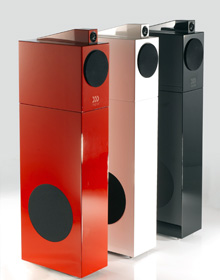
Morel has announced upgrades of their
Octave Signature loudspeakers, which benefit from features first
seen in their Fat Lady model ($32,000/pair). These include a
cabinet devoid of any internal damping, which allows it to
"sing" along with the drive-units. According to Morel's
listening tests, this results in a sound that is "much more open
and much cleaner." The system consists of the Octave Signature
Bookshelf ($2299/pair), which can be combined with the Octave
Signature Subwoofer ($2299/pair) to form a full-range
floorstanding loudspeaker. The Bookshelf has a 5.25"
bass/midrange driver with a 3" voice-coil, and an Acuflex
soft-dome tweeter with powerful neodymium magnets. The
Subwoofer's two 9" drivers are arranged in an isobaric
configuration. With the Signature Centre speaker ($1699), a full
5.1-channel surround system of Octave Signatures can be
assembled. The speakers are available in gloss red, black, and
white piano finishes.
|
SoundStage!
BackStage!
No.135
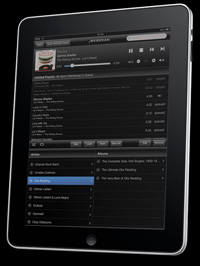 Since
the launch of the iPad on April 2, Apple claims to have sold
more than 3 million of the devices in as many months, and it
seems that audio manufacturers have taken notice. In March,
Meridian Sooloos introduced an iPhone/iPod Touch app for the
wireless control of their music-server system, and have now
introduced a new version that adds iPad support. It's available
for free download at the Apple iTunes App Store. Since
the launch of the iPad on April 2, Apple claims to have sold
more than 3 million of the devices in as many months, and it
seems that audio manufacturers have taken notice. In March,
Meridian Sooloos introduced an iPhone/iPod Touch app for the
wireless control of their music-server system, and have now
introduced a new version that adds iPad support. It's available
for free download at the Apple iTunes App Store.
Speaking of
server-based music systems, Gary Leonard Koh, of Genesis
Advanced Technologies, has published an interesting white paper,
"Building
an Absolute Fidelity Music Server." It includes many tips you can try, such as disabling certain services
in Windows -- System Paging, Plug and Play, and many others --
that, he claims, can degrade the sound quality of a
Windows-based server. Experiment with these at your own risk,
however; some of them can make your system unstable.
 One
thing that's generally agreed on is the need to avoid the use of
the Kernel Audio Mixer driver (KMixer), which Windows uses to
resample the digital audio bitstream. Koh suggests using
Foobar2000 as a media player, and installing the Audio Stream
Input Output (ASIO) plug-in and the USB DAC ASIO driver from
asio4all.com.
Doug Schneider has been using the ASIO driver with Ayre
Acoustics' QB-9 USB DAC, with fantastic results. Gary Koh
mentioned to me that, when using a system running Windows Vista
or Windows 7 (he uses Windows XP), something called Windows
Audio Session API (WASAPI) can be used to output an unaltered
digital audio signal. With Foobar2000, it's as simple as
installing the WASAPI plug-in and selecting it from the
Preferences menu. To prevent audio dropouts, I did have to
reduce the buffer length to 1000ms, the minimum length
recommended, but I found that I slightly preferred the sound of
the WASAPI to the Kernel Streaming plug-in I'd been using. The
sound was just a little bit cleaner and better defined,
especially in the bass. One
thing that's generally agreed on is the need to avoid the use of
the Kernel Audio Mixer driver (KMixer), which Windows uses to
resample the digital audio bitstream. Koh suggests using
Foobar2000 as a media player, and installing the Audio Stream
Input Output (ASIO) plug-in and the USB DAC ASIO driver from
asio4all.com.
Doug Schneider has been using the ASIO driver with Ayre
Acoustics' QB-9 USB DAC, with fantastic results. Gary Koh
mentioned to me that, when using a system running Windows Vista
or Windows 7 (he uses Windows XP), something called Windows
Audio Session API (WASAPI) can be used to output an unaltered
digital audio signal. With Foobar2000, it's as simple as
installing the WASAPI plug-in and selecting it from the
Preferences menu. To prevent audio dropouts, I did have to
reduce the buffer length to 1000ms, the minimum length
recommended, but I found that I slightly preferred the sound of
the WASAPI to the Kernel Streaming plug-in I'd been using. The
sound was just a little bit cleaner and better defined,
especially in the bass.
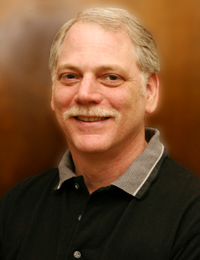 Last
month we reported that Sandy Gross, one of the founders of both
Definitive Technology and Polk Audio, was launching with Don
Givogue, another DefTech founder, a new speaker company called
GoldenEar Technology. Joining them will be longtime industry
veteran Jack Shafton, who will serve as the new company's
vice-president of sales and marketing. Shafton comes to
GoldenEar after 15 years with Paradigm Electronics, where for
the past five years he served as VP of sales and marketing,
overseeing the Paradigm and Anthem brands. Before that, in the
1990s, he was an owner and the president and CEO of SOTA, and
before that worked for Acoustat. According to Shafton,
GoldenEar's "initial product offerings embody significant
engineering breakthroughs and will adhere to the highest
standards of superb sonic performance, elegant, sophisticated
styling and exceptional value." Considering the track records of
these three men, we can't wait to see and hear what GoldenEar
has come up with at the upcoming CEDIA Expo in
Atlanta,
Georgia,
September 23-26. Last
month we reported that Sandy Gross, one of the founders of both
Definitive Technology and Polk Audio, was launching with Don
Givogue, another DefTech founder, a new speaker company called
GoldenEar Technology. Joining them will be longtime industry
veteran Jack Shafton, who will serve as the new company's
vice-president of sales and marketing. Shafton comes to
GoldenEar after 15 years with Paradigm Electronics, where for
the past five years he served as VP of sales and marketing,
overseeing the Paradigm and Anthem brands. Before that, in the
1990s, he was an owner and the president and CEO of SOTA, and
before that worked for Acoustat. According to Shafton,
GoldenEar's "initial product offerings embody significant
engineering breakthroughs and will adhere to the highest
standards of superb sonic performance, elegant, sophisticated
styling and exceptional value." Considering the track records of
these three men, we can't wait to see and hear what GoldenEar
has come up with at the upcoming CEDIA Expo in
Atlanta,
Georgia,
September 23-26.
. . . Roger Kanno
rogerk@soundstagenetwork.com
|